
Image credit — Gemini
The Hidden Cost of Modern Work
A serious problem today I will tell you today. I am perplexed about this but do not want you to get affected.
Actually, Most professionals don’t lose time because of difficult work.
They lose time because of repetitive work. Boring tasks.
The meetings.
The emails.
The reports.
The spreadsheets.
The summaries.
The status updates.
The follow-up messages.
The endless cycle repeats every day.
Day after day. Time after time.
Many employees spend hours doing tasks that feel productive but create very little value.
A manager spends thirty minutes writing meeting notes.
A marketer spends two hours preparing a campaign report.
An analyst manually organizes spreadsheet data.
A salesperson rewrites the same email dozens of times.
By the end of the week, entire workdays have disappeared.
Not because the work was important.
Because the work was repetitive.
And that’s exactly why AI assistants are attracting so much attention.
Yes, I know that Artificial intelligence has existed for years.
But most AI tools required users to leave their workflow.
Open a website.
Copy information.
Paste information.
Repeat.
Microsoft approached the problem differently.
Instead of asking users to visit AI, Microsoft brought AI directly into the applications people already use every day.
Word.
Excel.
PowerPoint.
Outlook.
Teams.
Windows.
This seemingly simple change created enormous interest.
The AI is no longer separate from work.
It becomes part of work. Your time is so much saved that you can use it other productive tasks.
That’s one reason Microsoft Copilot has become one of the most discussed enterprise AI products in the world.
Now, hold on there’s something more interesting coming.
A Hidden World Most Workers Haven’t Discovered Yet

Many people think Copilot is just a chatbot.
That’s like saying a smartphone is just a calculator. But I do not want you to stuck in that belief.
Wake up.
Feel the realm of Ai and what you can do with it in your life. That is what I want for you.
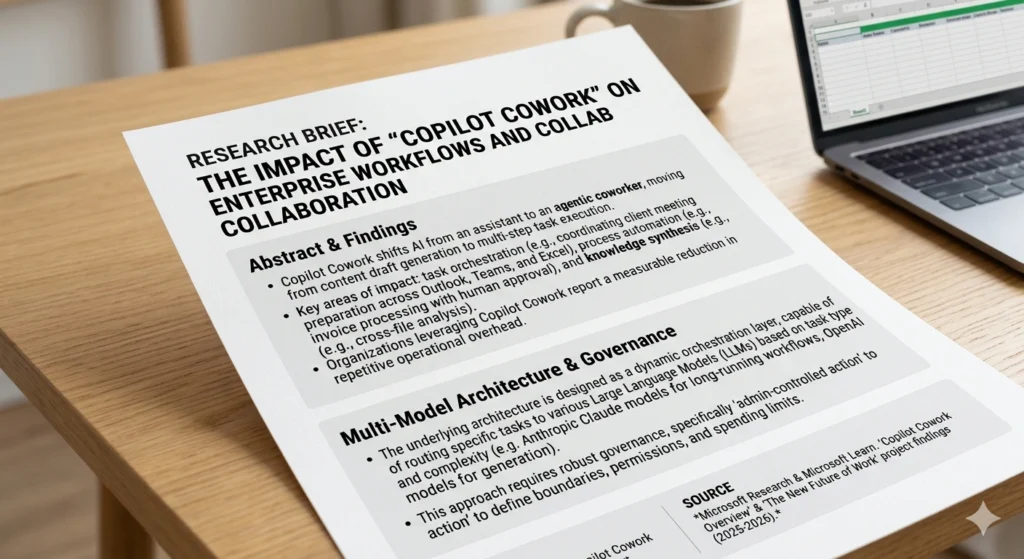
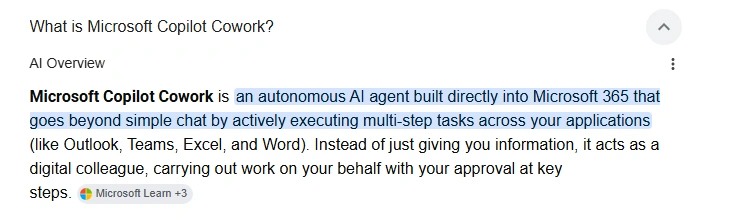
The real value appears when Copilot becomes a digital coworker.
Imagine opening your inbox and seeing a summary instead of hundreds of emails.
Imagine attending a meeting and receiving automatic notes.
Imagine receiving a PowerPoint draft before creating a presentation.
Imagine generating reports from raw spreadsheet data in seconds.
This is the hidden world many organizations are beginning to explore.
The goal isn’t replacing workers.
The goal is reducing repetitive tasks.
And please for your sake, do not leave this and scroll as an another update.
I want you to take action and improve your life.
But have you realized what I am saying so? You will be amazed and for that you need to continue.
No other options, right?
Okay. Historically, productivity advantages came from:
- Better education
- Better software
- Better processes
Today another factor is emerging. Now the amazing part arrives. And that thing is..
AI leverage.
Two employees may have identical experience.
The employee who effectively uses AI may complete work significantly faster.
Not because they work harder.
Because they eliminate friction.
This is becoming a new workplace skill.
Understanding how to collaborate with AI.
I do not want you to pester around and be a traditionally working guy.
Explore the new options at least for yourself.
I want you to take time and think about it.
I will help you in this regard and give you an review about what this new tool is all about.
Microsoft Copilot is an AI-powered assistant integrated into Microsoft’s ecosystem.
It combines large language models with Microsoft 365 applications.
Instead of switching between multiple tools, users can interact with AI directly inside familiar software.
Think of it as a productivity layer that sits on top of your workflow.
I want you to excel at work. And this tool can actually help in achieving it.
Now let’s examine the repetitive tasks it can automate.
30 Repetitive Tasks Microsoft Copilot Can Automate Today
Email Management
1. Summarizing Long Email Threads
This is One of the most useful features. Emails are the messages which can take lot of time if done manually.
Instead of reading dozens of replies, Copilot creates concise summaries.
Benefit
Thus, it Saves time and reduces inbox fatigue.
2. Drafting Email Responses
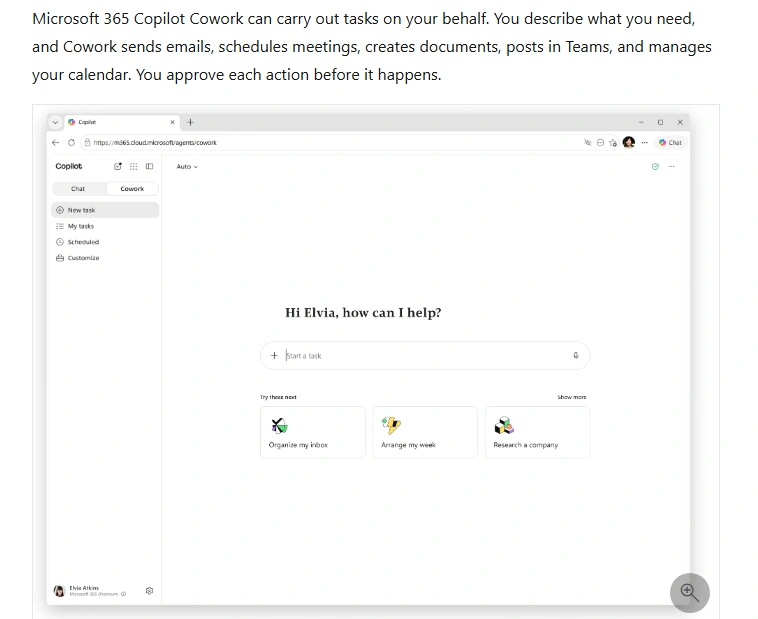
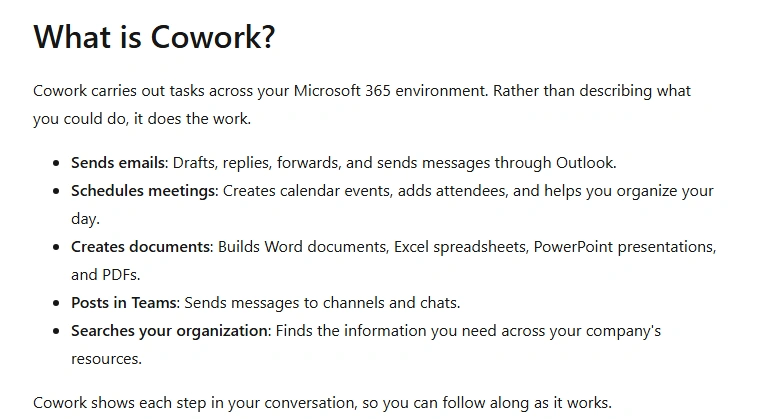
Copilot cowork can create professional replies based on context. You provide in a sentence or two and your job is done.
Benefit
Reduces repetitive writing.
3. Rewriting Emails
If you write emails and need expert help, then I think this can help you out.
Need a more professional tone?
More friendly?
More concise?
Copilot can rewrite messages instantly.
4. Creating Follow-Up Emails
Following up repeatedly can become exhausting. Your entire energy of the day can be drained and pay attention to this very carefully,
Copilot generates personalized follow-up drafts. So, your role is minimized.
5. Prioritizing Important Messages
Copilot helps identify emails requiring immediate attention. You now know which email is a priority and which one is important.
Meeting Automation
6. Generating Meeting Summaries
One of the biggest productivity wins is this feature. At work place, now this is a boon if you utilize it well.
Copilot summarizes discussions automatically and that is a big relief.
7. Creating Action Items
Instead of manually tracking commitments, Copilot extracts tasks from meetings. You will never attain such kind of efficiency manually,
8. Identifying Decisions
Important decisions are highlighted automatically. Thus, you can skip other non important tasks that are not worth of your time.
9. Preparing Meeting Agendas
Copilot drafts agendas based on previous conversations. How interesting is that!! It’s an just another assistant 24/7 working for you.
10. Catching Up on Missed Meetings
Missed a meeting?
Copilot summarizes what happened. Very cool !!
Word Document Automation
11. First Draft Creation
Copilot generates initial drafts from prompts. If you do this manually, you have to create teams and invest a lot of time, still the results will be at the odds.
12. Executive Summaries
Long reports can be condensed instantly. Wonderful !!
13. Document Rewriting
Improve clarity, structure, and tone. I want you to improve your writing with this tool. You will be happy you did that task.
14. Content Expansion
Turn brief notes into detailed documents. If you are a content creator, big congrats. You can do tasks in a pinch. Just a matter of seconds.
15. Grammar and Style Improvements
Copilot refines content for professionalism. Now, you are a writer whose name can be put along side the iconic writers like rudyard kipling. Great.
Excel Automation
16. Data Analysis
Copilot identifies patterns and trends. Wow, that’s a another big story. You are now a expert in analysis as well.
17. Formula Creation
Describe what you need.
Copilot suggests formulas. Very nice.
18. Data Visualization
Generate charts and graphs automatically. Gone are the days of the old design tools which required manual work. Get your work quickly in a few prompts.
19. Forecasting Trends
Identify future forecasting based on historical data. That’s a another skill you develop.
20. Spreadsheet Summaries
Receive insights without manually reviewing every row. Whether you are hiking at mountains or travelling, you do not require to do all things manually.
PowerPoint Automation
21. Creating Presentations
Generate slide decks from documents. A single prompt and generate a slide that is ready for usage.
22. Designing Slides
Copilot suggests layouts and visuals.
23. Summarizing Reports Into Slides
Transform long documents into presentations. Now, this part is extremely interesting. Earlier, you have to sit down for long hours and prepare reports. But now that is totally obsolete.
24. Speaker Notes
Generate presentation talking points. That is too nice.
25. Visual Storytelling Suggestions
Improve communication and engagement. Yes, you can literally improve that as well. Such is the ability of this tool and i do not want you to miss it.
General Productivity
26. Task Prioritization
Identify what matters most. You must value your time and set priorities accordingly and this will surely help. At least, now have a look. There’s really a spark in it.
27. Research Summaries
Condense information rapidly. Yes, this is too a nice feature.
28. Workflow Assistance
Recommend next actions. You can now know what to do next and what consequence it will create. That’s like you are being a genie of the lamp.
29. Knowledge Retrieval
Find information across company files. That is common and okay.
30. Daily Work Summaries
Receive concise updates on ongoing projects. Yes, that we have discussed above.
So you saw how this tool can create wonders for you. So, get back and do a favour to yourself by searching it on google and checking it. But before that there’s some belief and conception that I think you must be clear before using. So, continue now.
Why These Automations Matter
I think Individually, each task may save only minutes.
But Collectively, they save hours. Now,. we are getting something.
Hours become days.
Days become weeks.
This is why organizations are investing heavily in AI-assisted productivity.
The real value isn’t one feature.
It’s the cumulative reduction of repetitive work.
And this is what you will achieve in your life using this tool.
Imagine a business owner.
Before Copilot:
- Reads 120 emails
- Attends five meetings
- Writes status reports
- Creates presentations
After Copilot:
- Reviews email summaries
- Receives automated meeting notes
- Generates reports faster
- Builds presentations from existing documents
The owner still performs the important work.
But spends less time on administrative friction.
That distinction is critical.
AI handles repetition.
Humans focus on judgment.
This is the skill you must learn to develop now.
The skill of next decade.
The Difference Between Owning Copilot and Actually Using It
Many organizations purchase software.
But I feel sorry to say that Few extract maximum value from it.
The same thing appears with AI.
Some employees open Copilot occasionally.
Others integrate it deeply into daily workflows.
The difference can be dramatic. And it can be seen in results.
Think about a calculator.
Owning a calculator doesn’t make someone better at math.
Knowing when and how to use it does.
Microsoft Copilot works the same way.
The organizations experiencing the largest productivity gains aren’t merely adopting AI.
They’re redesigning workflows around AI. And you must do the same if want to gain from this tool.
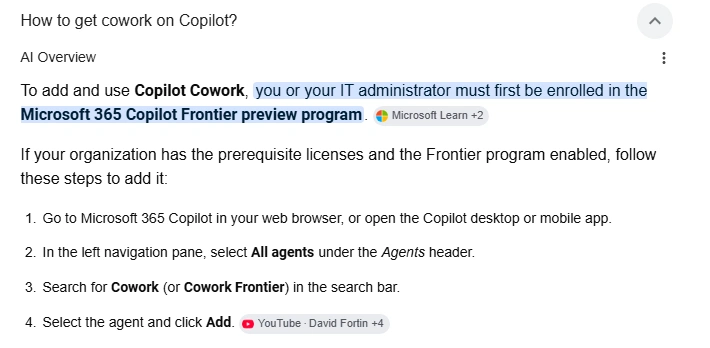
Now, I will share with you how to use this tool the splendid Microsoft copilot cowork.
Many beginners make the same mistake. You know it probably.
They ask vague questions.
Examples:
Bad prompt:
“Help me with this report.”
Better prompt:
“Summarize this 15-page report into five executive-level bullet points focused on revenue growth, risks, and next-quarter recommendations.”
Specific instructions usually produce better results.
Yes, write it down that and sticky at your office table.
Email Automation Tutorial
Email remains one of the biggest productivity drains in modern workplaces.
A typical employee may process dozens or even hundreds of messages daily. That’s really cumbersome.
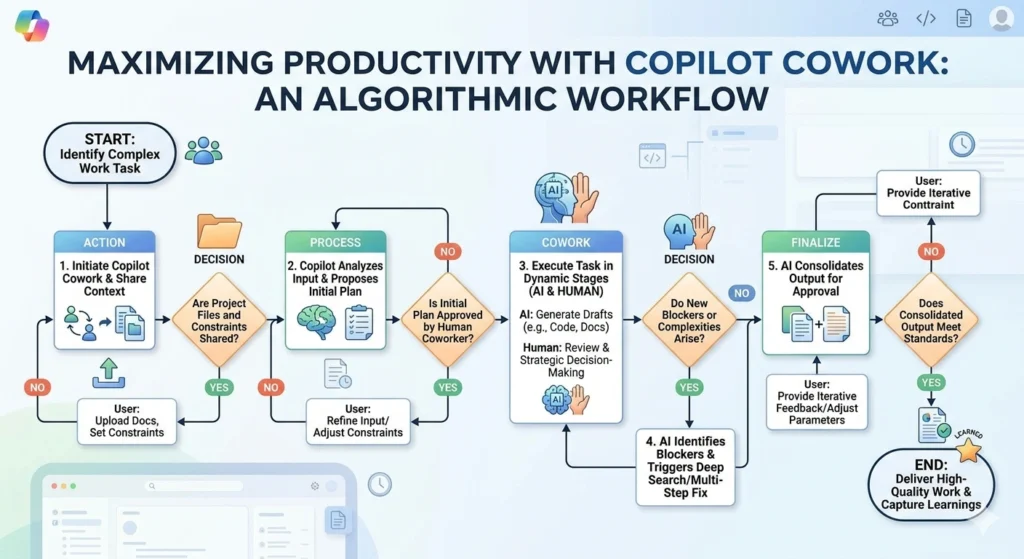
Here’s the suggested workflow:
Workflow Example
Step 1
Open Outlook with Copilot enabled.
Step 2
Request:
“Summarize all email activity related to Project Alpha this week.”
Step 3
Review the summary.
Step 4
Generate follow-up emails.
Step 5
Approve and send.
Instead of manually reviewing dozens of messages, the employee receives actionable information quickly.
Meeting Automation Tutorial
Meetings often create two separate workloads.
First, attending.
Second, documenting.
Copilot reduces the second workload significantly.
Workflow Example
During a Teams meeting:
- Record discussion
- Generate summary
- Extract decisions
- Create action items
- Share notes automatically
The result is a more accurate record and less administrative effort.
Word Document Workflow
Many documents begin with a blank page.
The blank page creates friction. You do not know where to begin.
And that literally wastes time.
Copilot reduces this friction. here’s an example below.
Example
Prompt:
“Create a 1,500-word proposal for implementing AI productivity tools in a mid-sized marketing agency.”
Copilot generates a starting point.
The user then improves and customizes the output.
This approach often accelerates drafting significantly.
Excel Workflow
Spreadsheets can intimidate even experienced professionals.
Complex formulas consume valuable time.
Example
Instead of searching online:
“How do I create this formula?”
Users can ask:
“Calculate monthly revenue growth percentage across these columns.”
Copilot generates recommendations directly inside Excel.
This dramatically reduces formula frustration.
PowerPoint Workflow
Many presentations involve repetitive work.
Collect information.
Organize information.
Design slides.
Create talking points.
Copilot automates large portions of this process.
Example
Upload a report.
Request:
“Create a 12-slide executive presentation highlighting major findings.”
Copilot generates a draft deck.
The user then refines the presentation.
Problems And Fixes
This is what I wanted to convey you. No AI system is perfect.
Understanding limitations helps maximize results.
Problem 1: Imbalance
Sometimes AI generates inaccurate information.
Example
Incorrect statistics.
Invented facts.
Misinterpreted context.
Fix
Always verify important information.
Copilot should assist decisions.
Not replace verification.
Problem 2: Generic Output
Sometimes generated content feels blend.
Fix
You can Provide more context and unique data.
Include:
- Audience
- Goals
- Tone
- Constraints
Better inputs often create better outputs.
Problem 3: Concerns
Organizations worry about sensitive information.
Fix
Understand company policies.
Use approved environments.
Follow security guidelines.
Problem 4: Overreliance
Some users begin accepting every AI suggestion.
Fix
Maintain critical thinking.
The strongest users collaborate with AI.
They don’t surrender judgment to AI.
Problem 5: Learning parabola
New users sometimes feel overwhelmed.
Fix
Start small.
Automate one task.
Then another.
Then another.
Gradual adoption often produces better results.
COMPARISONS WITH OTHER TOOLS
Copilot vs ChatGPT
A common question. You might be using chatgpt. But let’s see what each one offers.
Microsoft Copilot
Strengths:
- Microsoft integration
- Outlook
- Teams
- Excel
- Word
- PowerPoint
Ideal for workplace productivity.
ChatGPT
Strengths:
- Broad knowledge
- Creativity
- Flexible use cases
Excellent for research and ideation.
Copilot vs Gemini
Gemini benefits from integration with Google’s ecosystem.
Strengths:
- Workspace integration
- Search capabilities
Copilot’s advantage lies within Microsoft environments.
Copilot vs Claude
Claude is known for strong reasoning and long-document handling.
Strengths:
- Detailed analysis
- Long-context tasks
Copilot’s advantage is workflow integration.
Which One Is Best?
There is no universal winner.
The answer depends on context.
If your organization lives inside Microsoft 365, Copilot often provides the most seamless experience.
If your focus is brainstorming or long-form analysis, other AI systems may excel in certain situations.
Most discussions focus on time savings.
But another benefit deserves attention.
Mental energy.
Repetitive work creates cognitive fatigue.
Employees become exhausted by low-value tasks.
Reducing administrative friction can improve focus on higher-value work.
That benefit is harder to measure.
But often more important.
The real question is no longer:
“Can AI automate repetitive work?”
The answer increasingly appears to be yes.
The more interesting question is:
“What becomes possible when repetitive work consumes less of your day?”
That’s where the next chapter begins.
Future Predictions: What Happens Next?
Nobody can predict the future perfectly.
However, several trends appear increasingly likely.
Prediction 1: Copilot Becomes More Proactive
Today’s Copilot primarily responds to requests.
Future versions may anticipate needs.
Imagine arriving at work and seeing:
- Priority tasks
- Important emails
- Upcoming risks
- Suggested actions
Before asking anything. It keeps you updated with the things you have to do for the day.
The assistant becomes increasingly proactive.
Prediction 2: Cross-Application Intelligence
Future workflows may become more connected.
Imagine:
An email arrives.
Copilot identifies action items.
Creates tasks.
Schedules meetings.
Updates documents.
Generates reports.
Without requiring separate instructions.
The workflow itself becomes intelligent.
Prediction 3: Industry-Specific Copilots
General productivity is valuable.
Specialized productivity may be even more valuable.
Future versions may include expertise tailored to:
Healthcare
Medical workflows.
Legal
Case preparation.
Finance
Analysis and compliance.
Engineering
Technical documentation.
Marketing
Campaign optimization.
Industry specialization could dramatically increase usefulness.
Prediction 4: AI Coworkers
Today Copilot functions primarily as an assistant.
Tomorrow it may resemble a teammate.
Not replacing people.
Supporting people.
Helping manage increasingly complex workloads.
The distinction matters.
The future workplace may involve collaboration between humans and AI systems.
Alternatives To Microsoft Copilot
Copilot is not the only option.
Several alternatives exist.
ChatGPT
Excellent for:
- Brainstorming
- Writing
- Research
- Content generation
Strength:
Flexibility.
Claude
It is Known for:
- Long document analysis
- Reasoning
- Detailed explanations
Strength:
Handling complex information.
Gemini
Integrated with Google’s ecosystem.
Strength:
Workspace connectivity.
Notion AI
Useful for:
- Notes
- Documentation
- Knowledge management
Strength:
Productivity workflows.
Specialized AI Tools
Many organizations combine multiple AI platforms.
Different tools excel in different scenarios.
The future may involve ecosystems rather than single solutions.
Frequently Asked Questions
Is Microsoft Copilot Worth It?
For many professionals, yes.
Particularly those who spend significant time:
- Writing
- Meeting
- Reporting
- Communicating
The potential productivity gains can be meaningful.
Does Copilot Replace Employees?
No.
Copilot automates tasks.
People still provide:
- Judgment
- Creativity
- Leadership
- Strategy
- Decision-making
The strongest results often come from collaboration.
Is Copilot Accurate?
Usually.
Not always.
Users should verify important outputs.
Especially:
- Financial information
- Legal information
- Strategic decisions
Can Small Businesses Benefit?
Absolutely.
In fact, smaller organizations may experience significant benefits because limited teams often handle many responsibilities.
Automation helps stretch resources.
What Skills Become More Important?
As AI automates repetitive work, human strengths become increasingly valuable.
Examples:
- Critical thinking
- Communication
- Problem-solving
- Creativity
- Leadership
These capabilities remain difficult to automate.
Will Copilot Continue Improving?
Almost certainly.
The broader AI industry continues evolving rapidly.
Future versions will likely become more capable.

Whether you ultimately choose Microsoft Copilot, another AI assistant, or a combination of tools, one reality appears increasingly clear.
The workplace is evolving. You need to take a decision.
A decision that will make your life’s progress.
The question is not whether AI will influence productivity.
The question is how individuals and organizations choose to use it.
Those who experiment thoughtfully today may discover advantages that become increasingly valuable tomorrow.
The goal is not replacing human capability.
The goal is expanding it.
And for many professionals, that journey begins with automating the repetitive tasks that consume far more time than they should.
FINAL THOUGHTS
Microsoft Copilot is not merely another software feature.
It represents a shift in how people interact with information.
By automating repetitive tasks such as:
- Email management
- Meeting summaries
- Document creation
- Spreadsheet analysis
- Presentation development
Copilot allows professionals to redirect attention toward work that requires uniquely human strengths.
The most significant benefit may not be the minutes saved on any single task.
It may be the cumulative effect of reducing friction across an entire workday.
Small improvements become large improvements.
Hours become days.
Days become opportunities.
And in a world where attention is increasingly valuable, that may be the most important productivity upgrade of all.
REFERENCES:
OTHER READS:
A useful youtube video:
A useful pinterest pin:

Linkedin -- www.linkedin.com/in/shishir-bhargava-68a8b4257
- 2026 Lexus IS 350 F Sport: Shocking review - August 22, 2026
- Why Global Markets Can Turn Nervous Overnight | How to prepare for it - July 9, 2026
- Why Countries Are Competing for Rare Earth Minerals | Shocking Details Revealed - July 6, 2026
⚠️ Most People Discover Trends When It's Too Late
Join the Trends Goldmine Insider List and get emerging AI tools, future products, viral keywords, and hidden opportunities before they hit the mainstream.
While everyone else is chasing yesterday's trends, you'll be spotting tomorrow's opportunities first.
🚀 Free Weekly Trend Alerts • No Spam • Unsubscribe Anytime
SIGN UP NOW & RECEIVE A SHORT REPORT ON HOW TO MAKE FORTUNE WITH TRENDS.Trusted by readers who want to discover opportunities before the crowd.