


Image source – Official source
This software is making crazy..
I was reading newspaper on google news on my mobile today. It was as usual day but the topic which I read was about artificial intelligence. I usually skim everything but that particular article highlighted about how the technology has evolved with time.
Yes, my freind. Just sit wit me in a time machine and travel back to late 1990’s era. At that time, I can see the internet revolution has just started, smartphones had been lately popular, social media are just born. Isn’t it?
Now, come back to present moment. Can you co-relate it with the AI? Yes, this is really the advent of AI and the new revolution has just began.
So, I want you to take your cup of tea and get ready to know about one of the most smashing online tool ever released in this year.
This will be a total game changer, But how?
That’s what today we are going to see about what’s actually claude opus 4.7 can do for you, the possible problems with solutions and finally how to use it like a pro.
Claude Opus 4.7, released by Anthropic, is one of the most advanced AI models available today—especially strong in coding, reasoning, and creative tasks. But like every powerful tool, it comes with real-world issues that many users are already experiencing.
This guide cuts through the noise and gives you practical problems + proven solutions, so you can actually benefit from using it.
It will really save you from dozens of problems and frustrations improving your productivity. I will prove you with live examples so you can verify it.
Finally, we will also see some prompts that will make you expert in using this tool.
Check this flowchart below before starting which will help you gain upperedge to use this claude tool.

Data for the above image – chatgpt
Major Problems in Claude Opus 4.7 (And Why They Matter)
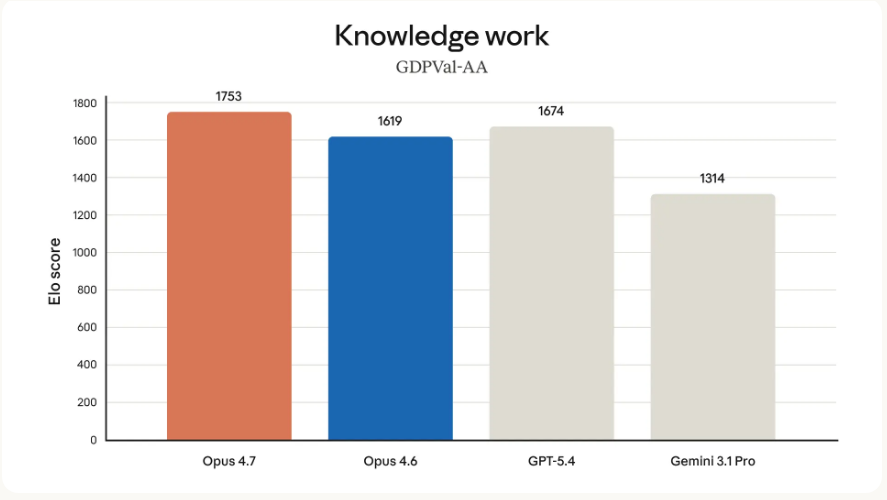
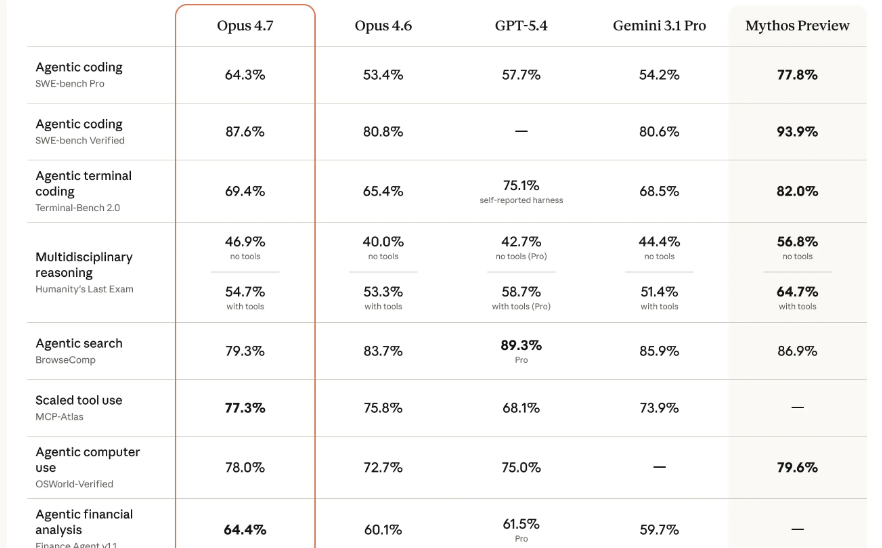
| 1. Weak Long-Context Understanding I think that this is my one of the biggest surprises. It is about performance dropped significantly in long documents. But let’s first understand about what is weak long context understanding? Actually, I found that in this situation the AI struggles to remember or correctly understand very long conversations, documents, or prompts. It may forget earlier details or mix information. Can you guess it, how much? Retrieval accuracy dropped from ~92% → ~59% The story does not end here, You might also struggle to find key info buried in large text. Why it matters: If you’re doing SEO articles, research, or large codebases → this can break your workflow. Solution: — I will suggest you to break input into smaller chunks (1k–3k tokens). — You should Ask: “Summarize each section first, then combine” — Use step-by-step prompts instead of dumping everything at once |
| 2. Training Bug (Reasoning Leakage) I was reading about the Anthropic website. I came across a amazing stat which disclosed a training bug affecting ~7.8% of data. This is something very serious issue. But let’s first define what actually bugs are and its behavior? Bugs are the Errors or unexpected problems in software that cause wrong outputs, crashes, or strange behavior. Model sometimes exposes or mishandles reasoning patterns. It Can lead to inconsistent or over-explained answers. My unique Solution: My solution will be to Use clear, outcome-focused prompts. “Explain your thinking step-by-step” “Give final answer with brief reasoning” Keep in mind to Avoid relying on internal reasoning consistency. |
| 3. Slower Responses & Higher Cost The tool which has just commenced can increase token usage. It’s something very common I find when solving ai tools problems. You may not know about api or token usage. I understand and this is completely normal for a non-technical person. I will define you in a simple language. API is a system that lets different apps or software communicate with each other automatically. And token usage is something that AI models read and generate text in small chunks called “tokens” (words or parts of words). More tokens = higher usage/cost and longer processing. Got it, good. I think you will have to face slower or “heavier” responses while using the tool. So, what actually will this do? This directly impacts: — API cost — App performance (especially if you’re building SaaS) My Solution: — What you can do is to always Set limits: max tokens. — The best thing you can do is to concise output mode. Other users are also suggesting to use Sonnet models for lighter tasks. Do you know about cache? It is just the Temporary stored data used to speed up responses and reduce repeated processing. I want you to Check Cache repeated outputs in your app to fix the problem. |
| 4. Perceived “Downgrade” in tool I saw one common flaw suggested by all the users is about the model. Some users feel the model is less impressive or inconsistent. Why? Let’s explore the Possible reasons: — Safety restrictions increased — Adaptive reasoning changes — Higher expectations from users Solution: Prompting is basically a field where you provide the inputs to the AI tool. The more you are good t it , the better the results you can obtain from it. My experience say that to Use structured prompting “Act as senior developer…” “Follow this format…” Increase reasoning depth where possible (if API supports) |
| 5. Strong Safety Restrictions Now, this tool Blocks certain cybersecurity or sensitive queries automatically. Sensitive queries like personal information, financial information etc is what we are talking about. It is actually Designed to prevent misuse. Problem: Now, what it does is that it Sometimes blocks legitimate technical queries Solution: Rephrase intent clearly: “Exploit vulnerability” “Explain how to secure against this vulnerability” Frame queries as educational or defensive. This will solve your problem. |
| 6. Availability & Access Issues I have seen some users can’t access latest versions immediately. There seems to be Rollout inconsistencies and occasional outages exist. Solution: — Update SDK / CLI tools regularly. SDK is a collection of tools, libraries, and code that helps developers build apps using a platform or API. CLI Programs operated through terminal/command prompts instead of graphical buttons, often used by developers for faster control and automation. — Restart sessions / clear cache — Use API directly if UI lags |
Artificial Intelligence (AI) is the branch of computer science that focuses on creating machines or software capable of performing tasks that normally require human intelligence. These tasks include learning, reasoning, problem-solving, understanding language, recognizing patterns, and making decisions.
In simpler terms, AI allows machines to mimic human thinking and behavior to complete tasks automatically or assist humans in decision-making.These were some of the things I felt will help you out. But check below the screenshot as well where i have a example done for you better understanding.


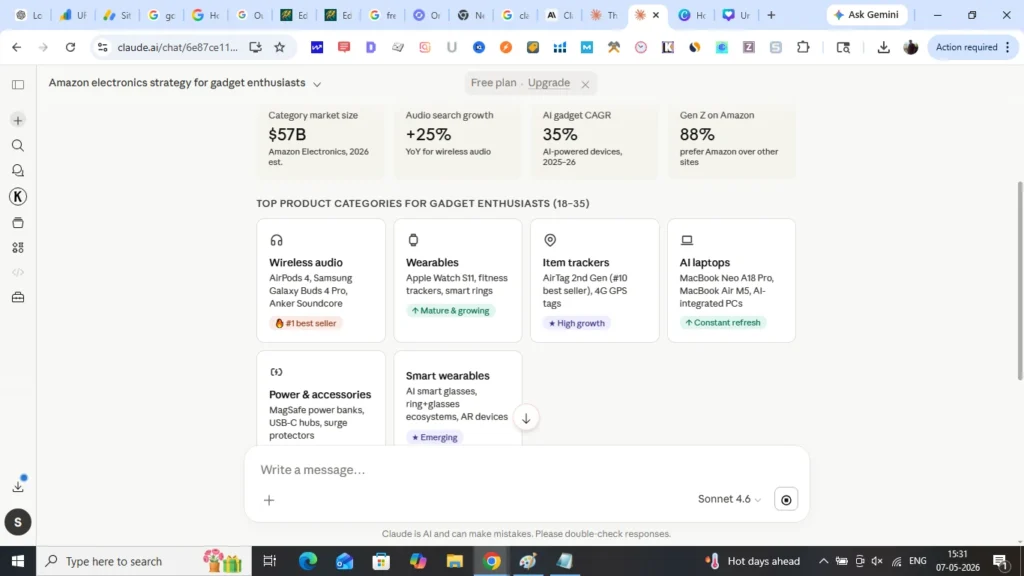
Image source – official website
Where Claude Opus 4.7 Actually Shines
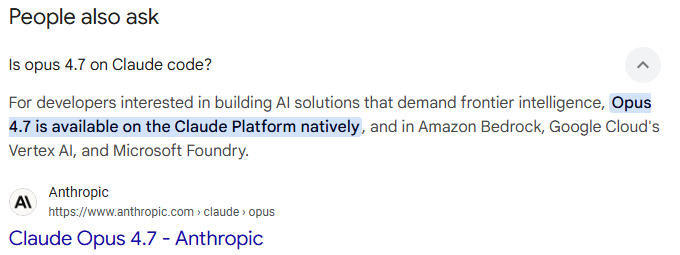
Do you know that Despite issues the tool is very versatile? Yes, it excels in:
— Advanced coding & debugging
— Multi-step reasoning tasks
— Image understanding (higher resolution support)
— Creative outputs (documents, UI, slides)
In fact, it significantly improves software engineering performance compared to earlier versions.
Best Way to Use Claude Opus 4.7 (Pro Strategy)

I was looking for some unique ways to use this tool for getting best results. If you want maximum results, follow this:
- Break tasks into steps (don’t overload context)
- Use clear role-based prompts
- Optimize for short, precise outputs
- Combine with other models/tools if needed
- Always verify critical outputs (especially research)
I also found by using the correct structured prompts, you will be saved by much hassle.
I will give some of them. You can try and check the outcome yourself.
| 1. Universal “High-Performance” Prompt (Use for Anything) Act as a top 1% expert in [TOPIC]. Your task: — Solve the problem clearly and accurately — Avoid unnecessary explanations — Focus on practical, usable output Instructions: — Break the answer into steps if needed — Keep it concise but complete If assumptions are made, state them briefly Output format: [Direct answer] [Optional short explanation] [Actionable steps] Now solve this: [YOUR QUESTION] Why it works: Forces structured thinking and reduces random verbosity. |
| 2. Long Content / SEO Article Generator (Fixes Context Issues) You are an SEO expert and content strategist. Task: Write a high-quality article on: [TOPIC] Process: Step 1: Create a structured outline (H1, H2, H3) Step 2: Write each section one by one Step 3: Ensure clarity, readability, and engagement Rules: Avoid fluff — Use simple language — Add actionable insights — Keep paragraphs short Important: Do NOT write everything at once. Start with Step 1 (outline only). Wait for my confirmation before continuing. Why it works: Prevents Claude from losing context or quality in long outputs. |
| 3. Coding / App Development Prompt (Very Powerful) Act as a senior software engineer. Task: [Describe your app/feature] Requirements: — Write clean, production-ready code — Use best practices — Add comments for clarity — Mention edge cases Output format: — Approach (brief) — Code Explanation — Possible improvements — Constraints: — Do not over-explain — Focus on correctness and efficiency Perfect for your Android / Kotlin / Jetpack Compose apps. |
Final Insight
If I have to give my opinion about the tool, then :
Claude Opus 4.7 is not vulnerable—it’s sensitive to prompting quality.
If you can:
- Structure prompts
- Limit scope
- Guide output format
You can get 2x–5x better results instantly.
References
https://agent-wars.com/news/2026-04-16-claude-opus-4-7-model-card
https://docs.bswen.com/blog/2026-04-09-claude-opus-performance-troubleshooting/
https://www.datastudios.org/post/claude-rollout-issues-why-many-users-still-can-t-access-it
https://www.vktr.com/ai-news/anthropic-launches-claude-opus-47/
https://www.axios.com/2026/04/16/anthropic-claude-power-user-complaints
Other problems and solutions:
— claude problems and solutions
— youtube shorts problems and solutions
— android gemini live problems and solutions
— iphone problems and solutions
— ios 26.5 problems and issues
— john ternus problems and their sol
— chatgpt 2.0 images problems and solutions
— chatgpt 5.5 and deepseekv4 problems with soln
— youtube tv multiview problems and solutions
— Yahoomail problems and solutions
— ios 26.4 widgets problems and solutions
— internal storage problems and solutions
— ev charging problems and solutions
— waterproof iphone problems and solutions
— mail problem in iphone and android
— a popular game problems and sol
A useful video:
Read more about the website here and can contact here.
A uselful pinterest pin:

Linkedin -- www.linkedin.com/in/shishir-bhargava-68a8b4257
- 2026 Lexus IS 350 F Sport: Shocking review - August 22, 2026
- Why Global Markets Can Turn Nervous Overnight | How to prepare for it - July 9, 2026
- Why Countries Are Competing for Rare Earth Minerals | Shocking Details Revealed - July 6, 2026
⚠️ Most People Discover Trends When It's Too Late
Join the Trends Goldmine Insider List and get emerging AI tools, future products, viral keywords, and hidden opportunities before they hit the mainstream.
While everyone else is chasing yesterday's trends, you'll be spotting tomorrow's opportunities first.
🚀 Free Weekly Trend Alerts • No Spam • Unsubscribe Anytime
SIGN UP NOW & RECEIVE A SHORT REPORT ON HOW TO MAKE FORTUNE WITH TRENDS.Trusted by readers who want to discover opportunities before the crowd.